AI Prompt Gallery
Publisher Description

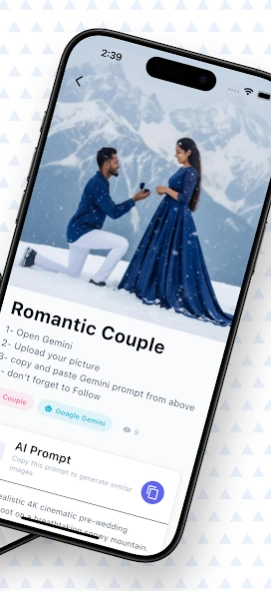


Discover amazing AI-generated art and get inspired for your own creations!
AI Prompt Gallery - SL Prompt Gallery
🎨 Discover the Future of Digital Art
AI Prompt Gallery is your ultimate destination for exploring stunning AI-generated images and finding inspiration for your own creative projects. Browse through thousands of beautiful artworks created by cutting-edge AI models like DALL-E, Midjourney, Stable Diffusion, and more.
✨ Key Features:
• Vast Collection - Explore 500+ curated AI-generated images
• Smart Search - Find images by keywords, categories, or AI models
• High Quality - All images in stunning HD resolution
• Offline Viewing - Download and view images without internet
• Favorites - Save your favorite images for quick access
• Regular Updates - New images added weekly
• Free to Use - No subscription required
🎯 Perfect For
• Digital artists seeking inspiration
• AI art enthusiasts
• Creative professionals
• Students learning about AI art
• Anyone who loves beautiful imagery
🔍 Advanced Filtering:
• Filter by AI model (DALL-E, Midjourney, Stable Diffusion, etc.)
• Browse by categories (Portraits, Landscapes, Abstract, etc.)
• Search by specific prompts or keywords
📱 User-Friendly Design:
• Clean, intuitive interface
• Smooth scrolling and navigation
• Optimized for all screen sizes
• Dark mode support
• Fast loading with smart caching
About AI Prompt Gallery
The company that develops AI Prompt Gallery is CyberyakkuTM. The latest version released by its developer is 1.0 .
To install AI Prompt Gallery on your Android device, just click the green Continue To App button above to start the installation process. The app is listed on our website since 2026-04-17 and was downloaded 3 times. We have already checked if the download link is safe, however for your own protection we recommend that you scan the downloaded app with your antivirus. Your antivirus may detect the AI Prompt Gallery as malware as malware if the download link to com.cy.promptgallery is broken.
How to install AI Prompt Gallery on your Android device:
- Click on the Continue To App button on our website. This will redirect you to Google Play.
- Once the AI Prompt Gallery is shown in the Google Play listing of your Android device, you can start its download and installation. Tap on the Install button located below the search bar and to the right of the app icon.
- A pop-up window with the permissions required by AI Prompt Gallery will be shown. Click on Accept to continue the process.
- AI Prompt Gallery will be downloaded onto your device, displaying a progress. Once the download completes, the installation will start and you'll get a notification after the installation is finished.
Program Details
System requirements
Download information
Pricing
Version History
version
posted on 2026-04-17
Native Sharing
Cleaner Interface
Bug Fixes & Improvements
version 1.0.5
posted on 2025-10-02
What's New in Version 1.0.5
Native Sharing
Cleaner Interface
Bug Fixes & Improvements
